
Description
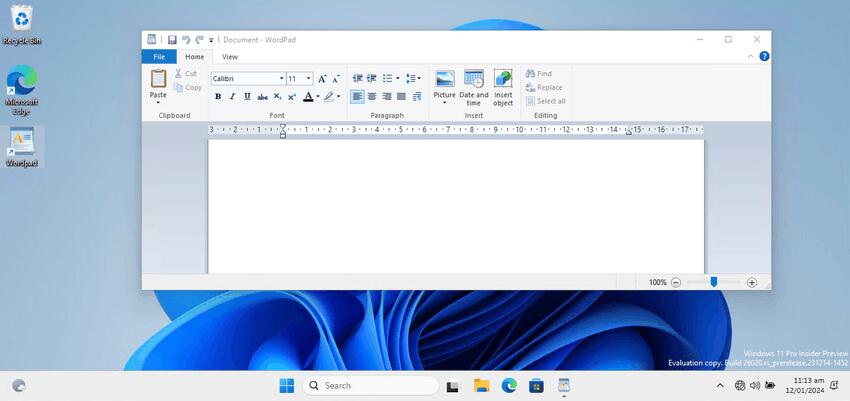
WordPad for Windows 11
Starting with Windows 11 Build 26020, Microsoft has removed the classic WordPad editor from clean installs, and then removed it from existing installations with an update. So the app has gone and can’t be reintalled from any official source. Microsoft has deprecated it and instists on using Word and Notepad instead of WordPad.
Here’s the package that restores WordPad in Windows 11. It is built of genuine files that aren’t tampered with. It will bring back the editor to your Start menu, and can also create a desktop shortcut if you want it.

 This package supports Windows 11, and containts both 32-bit and 64-bit files.
The WordPad app will have two its classic commands, e.g. you will be able to launch it as “write.exe” and “wordpad.exe” from the Run dialog or from the taskbar search. It will have the same interface language as your operating system, as it comes with MUI resources. Finally, it supports an uninstaller, so you can uninstall this WordPad app from the Settings > Apps > Installed apps.
It comes with almost the full set of MUI files, so it will be in your native language out-of-the-box. The following locale list is supported: ar-sa, bg-bg, cs-cz, da-dk, de-de, el-gr, en-gb, en-us, es-es, es-mx, et-ee, fi-fi, fr-ca, fr-fr, he-il, hr-hr, hu-hu, it-it, ja-jp, ko-kr, lt-lt, lv-lv, nb-no, nl-nl, pl-pl, pt-br, pt-pt, ro-ro, ru-ru, sk-sk, sl-si, sr-latn-rs, sv-se, th-th, tr-tr, uk-ua, zh-cn, zh-hk, zh-tw. It doesn’t install every single language, instead if checks what language you are using and extracts only the required files to save your disk space.
The Wordpad installer since version 2.0 not only extracts the files, but also does the following extra tasks:
- Adds RTF file association with all context menu entries it used to have.
- Adds New > Rich Text Document item to File Explorer.
- Adds OLE registration. Needed for object embedding.
Be the first to review “WordPad for Windows 11 (Free download)”
Related products
 Price range: $19.00 through $34.00
Windows 10 Pro Retail Cd Key


 $19.00




There are no reviews yet.